
Google just dropped an update in their docs on how content creators can keep their content from showing up in AI overviews.
This move comes at a time when content creators are continuously finding new ways to navigate the evolving space of AI-powered search results and control its impact on website traffic.
The updated guidance basically breaks down the troubleshooting steps for those that have implemented anti-AI preview controls but are still seeing their content show up in AI the overview section.
It’s a move that shows Google is stepping up their game to help creators handle the nuances of AI integration in search.
The search giant is making it easier for everyone to understand what they need to do to control how their content appears on their tool.
Key takeaways from the updated documentation include:
- Preview Controls Verification: Google really wants you to make sure that your preview controls (like
meta name="robots" content="nosnippet"ordata-nosnippet) are set up right and that Googlebot can see them. So make good use of the URL Inspection tool in Google Search Console; it’s super helpful for confirming everything’s working as it should! - Recrawling Reminder: Just a heads up, if you change things in your preview controls, it might take a while to see those updates — anywhere from a few days to a couple of months, depending on when Google decides to recrawl. The good news is, if you ask for a recrawl in Search Console, it might speed things up a bit!
- Community Support: If you’re running into some tough issues with your website, Google suggests checking out the Google Search Central Help Community. It’s a great place to team up with other webmasters, content writers, publishers etc. and figure things out together!
This update highlights the constant interaction happening between Google and webmasters about using web content for those AI-generated summaries.
How to Turn Off Google AI for Searches?
As you might already know, it’s impossible to completely get rid of Google’s AI Overviews.
But you can definitely make them appear less often or switch back to the old-school search view, where you only see links.
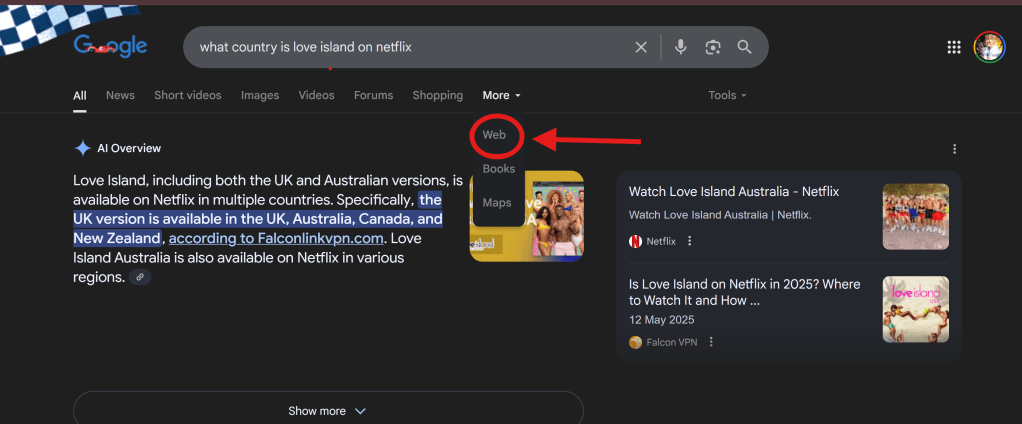
The easiest way to get around AI overviews is by hitting the “Web” tab in Google Search results—this lets you see regular links without the AI BS.
Here’s how:
- When you do a Google search, the results page shows a bunch of tabs like “All,” “Images,” “News,” and more.
- Locate the “Web” tab (you may need to scroll horizontally to find it).
- Clicking the “Web” tab will display the traditional search results, effectively bypassing the AI Overview.
If you want, you can also switch up your browser to something like Firefox or Safari, since they don’t show AI Overviews (yet).
If you get really creative with your search terms or make them super specific, it might help you steer clear of those AI overviews.
There are tons of browser extensions out there that can help you block or hide those AI Overviews. Some of the best ones to choose include:
- “Hide Google AI Overviews”
- “Disable AI Overview”
- “Bye Bye, Google AI”
Whichever one you choose, just make sure you do your homework and only pick ones from trusted sources to steer clear of any security headaches.
How To Block Google From Using Your Content To Train AI
Google says its AI Overviews and AI Mode are meant to deliver quick, helpful answers and point people to various relevant sources, but it seems like that sentiment isn’t shared by everyone.
Some creators are really stressing about all the fake info spewed by AI overviews, and don’t want their pages referenced on them, because it could damage their credibility.
For this reason, many add “NoAI” tags to the header of their pages or in the meta data, telling Google not to use their work to train AI models.
Just a heads up…if you block Google-Extended (that’s a crawler for some of Google’s AI products like Gemini), it’ll keep those bots from using your content to train their AI, but it won’t affect how your site shows up in regular Google Search or AI Overviews.
So if you really want to keep your content out of AI Overviews, you’ve got to block Googlebot from crawling those pages.
But!
That would also make your pages disappear from regular search results…
As you can see: finding that sweet spot between being seen and having complete control over your content can be tricky.
That’s why it’s super important for creators to find tools that can help them make smarter decisions about their web presence, as Google keeps updating its docs and changing the way search is done.
I’d advise you subscribe to my newsletter to keep up with the latest best practices for handling content in this ever-changing search world.
That way, you will be the first to know about any new information regarding Google, as they will be sent directly to your inbox regularly.
Discover more from Deconstruct Ed.
Subscribe to get the latest posts sent to your email.

