Categories
guide SEO

7 Types Of Questions You Need To Ask Before Starting Any SEO Campaign

Gone are those days when you had to cram a bunch of keywords into your content, or build a farm of links to have a successful SEO campaign.

A successful SEO campaign isnโ€™t just about tweaking keywords or building links…

itโ€™s more like a smart business move that kicks off with a detailed, multi-layered discovery process.

In this article, I’ve laid out seven key questionsโ€”or “types” of questionsโ€”that you need to tackle before diving into any SEO project.

By pulling together insights from business goals, website health, competition, and how users think, this framework gives you a roadmap for turning your site into a strong, money-making, and respected organic traffic source.

In this article, I’ll help you to really understand how to sync up your SEO work with your main business goals, set achievable expectations, and create a strategy that can handle the ever-changing world of search engines and market rivals.

The seven types of questions are:

  1. What Are The Business & Money Goals?
  2. Whoโ€™s Interested & What Are They Looking For?
  3. What’s The Competition Up To?
  4. What Is The Website’s Past & How Is It Doing Tech-wise?
  5. How Much Content Do You Have?
  6. What Are The Operational & Resource Limits?
  7. What Are The Success Metrics & Reporting Expectations?

These questions make up a go-to guide for anyone looking to get solid information, whether they’re a marketing manager, agency owner, or just a content creator flying solo.

1. What Are The Business & Money Goals?

This type of question lays down the basic “why” of the SEO campaign, making sure that all the decisions you make later on are in sync with the main business goals.

Instead of just chasing after empty stats, you really need to dig deeper into the reason for which you are doing SEO.

Rather than just wanting “more traffic”, you need to get to the heart of what “profit” and return on investment (ROI) means to the business.

Every SEO campaign, no matter how big or small, should kick off with clear, measurable goals. Saying “get more sales” is just an appetizer, not the main course.

Youโ€™ve got to narrow it down to the kind and quality of leads or sales we really want.

And that means knowing the client’s current processes inside and out and spotting areas that could use some work.

For example, if a client is pulling in tons of leads but they’re not really that great, the aim of the campaign could be to fine-tune the online audience so you’re only getting the most relevant demographics.

In that case, you might need to kick things off with questions that dig into the client’s financial model.

To get a solid grip on how the business makes money, you could ask:

“Which products or services are your cash cows?”

This insight will help you figure out where to put your SEO efforts.

But here’s the kicker: The strategy varies a lot from one industry to another.

For an e-commerce shop, you might want to highlight products that rake in the most cash or those that are trending right now.

But in the medical space, boosting local patient visits or pushing certain high-value services could be the goal.

Alternatively, for construction companies, ranking for specific project types in local searches could be what’s needed.

This tailored approach to each industry ensures your SEO work is actually driving revenue, and isnโ€™t just to get customers.

You would be snagging profitable customers from organic traffic.

But reaching this goal means you have to understand metrics that go beyond just counting how many people visit the site.

Most SEO guys often kick things off by first looking at traffic and rankings, but those are merely fancy stats that mean little without financial value.

The real connection between those figures and the big win of “more sales” lies in financial metrics like Customer Lifetime Value (CLV), Cost Per Acquisition (CPA), and Return on Investment (ROI).

These numbers link the campaign straight to financial success.

The following table lays out a number of SEO success metrics that are tied to financial value, to help you guide the way.

Table: SEO Success Metrics Hierarchy

2. Whoโ€™s Interested & What Are They Looking For?

Make sure your campaign is rooted in real human psychology, not just a bunch of mechanical algorithms.

In other words, get inside the head of the person typing away at their search bar and figure out what they really want.

One of the biggest mistakes marketers make is thinking their audience is “everyone”.

A smarter way to go would be to nail down the target audience by looking at demographics, but even more crucially, psychographics.

This way, you really get what drives them, what their fears are and what bothers them.

This kind of detail is invaluable for creating content that truly resonates with people and meets their needs.

To dig up this information, you need to ask some pointed questions about age, gender, and income.

Even more important than all that, youโ€™ve got to dig deeper into what makes them tick.

Think in terms of…

  • What pushes someone to make a purchase?
  • What are their main fears or worriesโ€”both at work and in their personal lives?
  • How do they usually research products or services before they buy, and who do they turn to for advice?

By peeling back these layers, you can build detailed profiles that act as the backbone of the whole campaign.

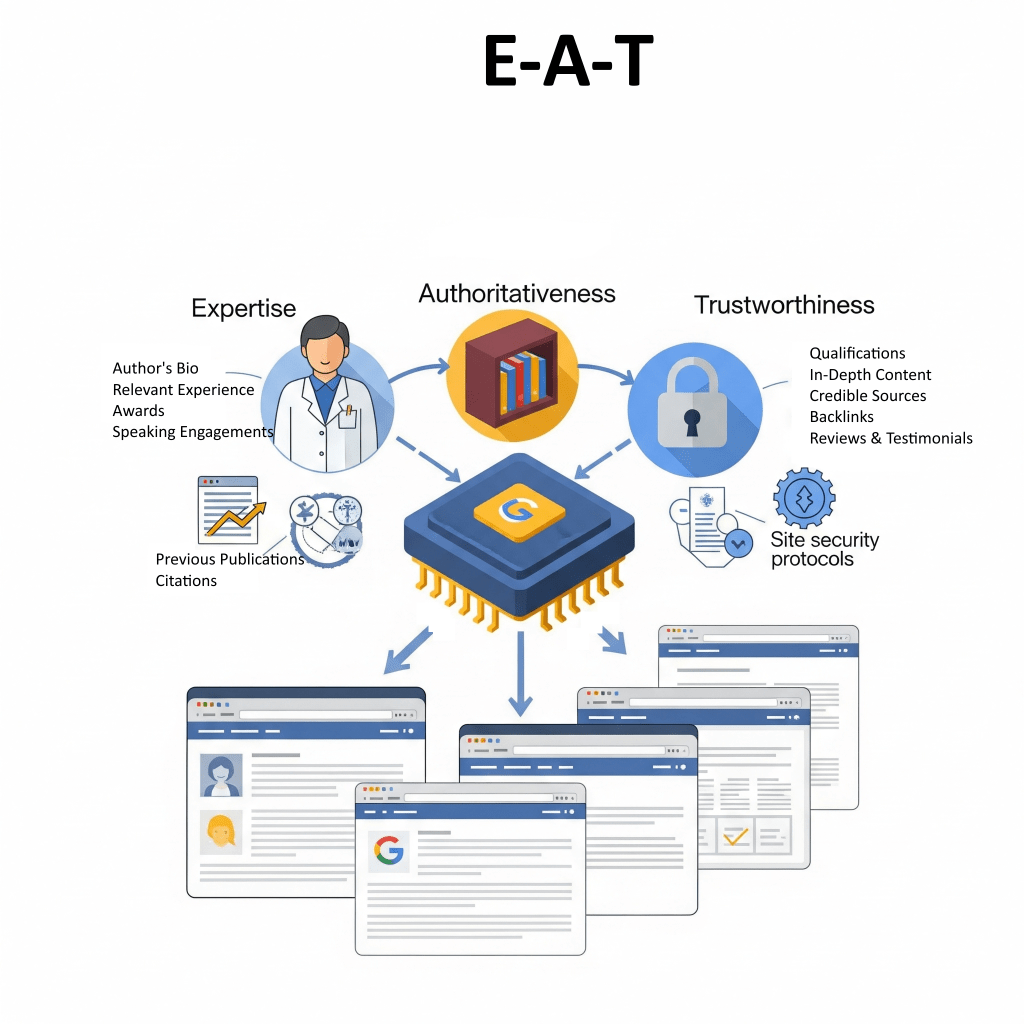
A campaign’s knack for building E-E-A-T (Experience, Expertise, Authoritativeness, Trustworthiness) really hinges on how well it gets what the audience is thinking and feeling deep down.

Think of a search query as a peek into someoneโ€™s real issue or need which are tied back to what they are worried about or whatโ€™s bothering them.

For instance, when someone types “how to fix a leaky faucet,” itโ€™s usually because theyโ€™re stressed about possible water damage or dreading a big plumbing bill.

If your content just skims the surface with basic solutions, itโ€™s not going to rank well compared to a detailed guide that…

  1. digs into the user’s real worries,
  2. highlights the authorโ€™s knowledge,
  3. and builds trust through clear and organized information

So, diving deep into what makes your audience tick is more than a nice-to-have; itโ€™s essential for crafting content that actually helps out.

This, in turn, can boost your rankings, get people more engaged, and maintain your authority.

The goal here is to turn these psychological insights into actionable keyword research.

Moreover, by really understanding what your audience is concerned with, you can pinpoint the four big types of user intent:

Informational, Navigational, Transactional, and Commercial Investigation.

For example, if someoneโ€™s worried about getting shoddy work done, they might search for “guide to choosing a home renovator,”…

whereas someone looking for a deal might type “best deals on outdoor gear.”

Keep in mind that most topics have a mix of intentions, and the search results pages (SERPs) show what Google thinks people are after.

The table below lines up audience psychographics with the keywords and content formats that will really hit the spot.

Table: Audience Persona & Search Intent Map

3. What’s The Competition Up To?

As any avid gamer would say “get to know the battlefield first before attacking the opps!”.

In business terms..this means, to do a deep dive and spot chances for standing out, that highlight where your competitors might be weak.

A solid SEO plan needs to not only know who the competitors are but also…

  • what theyโ€™re doing right,
  • where theyโ€™re dropping the ball,
  • and what makes your business special

It’s important to realize that competitors can vary between business models and SEO approaches.

For example, one might be a big industry blog rocking those informational keywords, while another is a smaller competitor going after those transactional terms.

When you dive into a competitive analysis, first fish out who the main players are.

Ask yourself the following questions:

  • Who are the top competitors, both online and offline?
  • Whatโ€™s their game in marketing, and what do customers love or hate about them?
  • And, of course, whatโ€™s your Unique Selling Point (USP) that sets you apart from the rest?

This last bit is super important because it shapes the core message for your entire campaign.

Don’t make the mistake of copying what others do!

Instead find that “untapped market space” where you can really shine.

A lot of marketers make the erroneous move of checking what competitors are ranking for and trying to beat them at their own game.

Most marketers do this because it feels safe, but this often turns into an expensive, head-to-head struggle for those high-traffic, super-competitive keywords.

A smarter play is to spot the “gaps or weaknesses” in what competitors are doing.

Maybe a competitor has a solid backlink profile but their content is pretty weak.

In that case, the savvy move would be to take advantage of that by crafting “better content” using tricks like the “Skyscraper Method”.

This way, you can build authority in a niche that the competitor has overlooked, making you the go-to expert on the topic.

While you’re positioning yourself as the go to expert, keep an eye on what your rival’s customers are saying…

For instance, if feedback shows that people stopped buying from a competitor because of lousy customer service, your content can shine a light on your top-notch service and quick responses.

This way, your brand comes across as a trustworthy choice and directly tackles a pain point the competition is ignoring.

Carve out a solid position, don’t just scramble for a short-term ranking.

The following table lays out a multi-faceted approach to competitive analysis.

Table: Multi-Faceted Competitor Analysis

4. What Is Your Website’s Past & How Is It Doing Tech-wise?

Before diving into a new strategy, you’ve gotta get a grip on the foundations.

A “pre-flight check” helps you spot potential penalties, any historical baggage, and technical hiccups that could sink a campaign before it kicks off.

If your website has a bad domain history or existing technical problems, that can really hold things back.

And by bad domain history, I’m not referring to 404 errors…

I mean having a reputation problem that often needs rebuilding trust with both search engines and users.

At this point, start by checking if your site has ever been hit with penalties or warnings from Google.

Dig deep into the domain’s history because a domain thatโ€™s been involved in spam, malware, or scams can cause some serious headaches – like indexing problems for new pages and lower search rankings.

In this case, any proactive SEO work, like creating content, researching keywords, or building links, will be held back by that sketchy domain history.

The initial phase of the campaign is about cleaning things up and building trust.

To create a strategy based on a solid historical audit, you have to disavow links, submit new sitemaps, and check the current technical state of the website.

Ask yourself: Are there any issues like broken links or slow load times?

See the checklist below for a handy framework for this foundational audit.

5. How Much Content Do You Have?

Take a good look at your current content stash, figuring out what’s actually there and whatโ€™s worth keeping based on the new campaign goals.

Your best treasure is usually your existing content and an audit helps pinpoint what can be used again…

Maybe there’s an awesome article that needs a little sprucing up?

What can and should be tossed out?

Think of the thin, low-quality content.

Many clients jump to the conclusion that they just need to “pump out more blog posts,” but thatโ€™s a one-way street that eats up resources.

A smarter play is to check out what they already have first.

Ask yourself these key questions, for a thorough content audit:

  • Is there a current content strategy, and how often do they churn out new stuff?
  • Who’s in charge of keeping things updated?
  • Plus, what’s actually working well, and how do we define “working well”?

The main goal is to find content thatโ€™s already killing it in rankings so it can be improved even more. These can be tweaked or repurposed to other formats such as infographics, images, podcasts etc.

That way, you build up the site’s authority using what already works instead of cranking out endless new materials.

This sets off a cycle where better content gets even more traffic and links, which ups the siteโ€™s authority.

And with higher authority, future content stands a better chance of ranking well too, making life easier with each new piece.

This approach shifts things from a โ€œcost-per-blogโ€ model to managing assets strategically.

You can use the following matrix to sort out existing content and guide your strategy.

Table: Content Audit & Strategy Matrix

6. What Are The Operational & Resource Limits?

Take the strategy from just being a cool idea to something that actually works by checking out what the client has in terms of resources, team setup, and budget.

There’s no point in having the best SEO strategy if the client can’t afford it or doesn’t have the right setup to pull it off.

By understanding these limits from the start, you avoid any awkward moments or crazy expectations later on.

Here are some questions you can fire off from the start, to make sure the strategy works:

  • What’s the budget for this project?
  • Is it a one-time thing or will there be ongoing costs?
  • Who’s the go-to person for SEO chats, and who calls the shots?
  • Whatโ€™s their operational reality? For instance, how long does it usually take to get content approved and posted?
  • How much help will the in-house dev or marketing team offer, and how savvy are they with SEO stuff?

A solid SEO plan has to grasp both the human side of things and the operational setup, in addition to the search engine algorithms.

A technically “perfect” SEO audit might suggest a full site migration, but that advice goes out the window if the clientโ€™s on a tight budget and doesnโ€™t have developers on standby.

In that case, you might need to conjure up a new plan that doesn’t drain resources.

So instead of going for a big migration, the strategy could zoom in on on-page content tweaks or link building, as those can be tackled with fewer hands on deck.

Keep in mind that the best strategy isn’t always the one that looks good on paper, but the one that can actually work in real life.

In that sense, any SEO engineer needs to be like a translator, turning techy recommendations into a game plan that fits what the client can realistically do.

The following table lays out how to match up strategic moves with what clients can manage.

Table: Operational & Resource Alignment

7. What Are The Success Metrics & Reporting Expectations?

How you measure, report, and, most importantly, adapt the campaign’s success over time matters a great deal.

Set some real expectations early on and turn the SEO relationship into a long-term, flexible partnership.

Remember: If you can’t measure it, you can’t manage it!

Before you dive in, you need to nail down the success metrics and timeline.

So, ask some key questions like:

  • What metrics will show us we’re doing well (like organic traffic, rankings, conversions)?
  • What tools will we use to keep track (think Google Analytics, Google Search Console, and other SEO tools)?
  • What does the client expect regarding timing and results?

You should also explain the two types of SEO metrics:

  1. Leading indicators, like keyword rankings and search visibility,
  2. Lagging indicators such as conversions and ROI.

Above all, the main question you should be asking, isn’t really “When will I see results?” but more like “How do I adapt when things change?”

Once you adopt that mindset, suddenly the focus shifts from “Am I on track?” to “Whatโ€™s changed, and how do I adjust?”

Businesses and junior marketers often think of SEO as a quick fix with a by-the-date result.

But SEO is really a dynamic, long-term game that gets influenced by things we can’t control, like algorithm changes and what competitors are up to.

And itโ€™s up to you as a strategist to help reset these expectations.

You can use the following template for a complete reporting dashboard.

Table: SEO Reporting Dashboard Template

A solid SEO campaign means planning smart and diving deep into analysis.

Use the seven-types framework in this article as a roadmap to turn your website from just a basic online hangout into a strong, money-making, trusted source that drives organic traffic.

This method makes sure that every SEO move you make is in sync with what your business really wants.

It is backed by a clear understanding of who your audience is, and taking a hard look at the competition and your own setup.

One healthy tip I can give you is to make sure that you start with this thorough discovery process because..

skipping these crucial questions usually leads to chasing empty metrics, ignoring real-life issues, and ultimately not getting a good ROI.

The real magic of a skilled SEO strategist isnโ€™t just their knack for handling technical tasks, but their ability to:

  • Ask the right questions right from the start
  • Turn complex data into a straightforward business game plan
  • Keep a flexible, long-term relationship focused on growth
Categories
guide SEO

How Google’s Algorithm Actually Works

Ever wondered how Google magically conjures up the perfect answers to your queries in milliseconds?

It’s not magicโ€”it’s just some super smart, always-changing algorithms working together like a well-oiled machine.

Their main goal is to link you up with the best and most reliable sources of information out there on the internet.

How they do this? Well, nobody knows for sure! (Except Google)

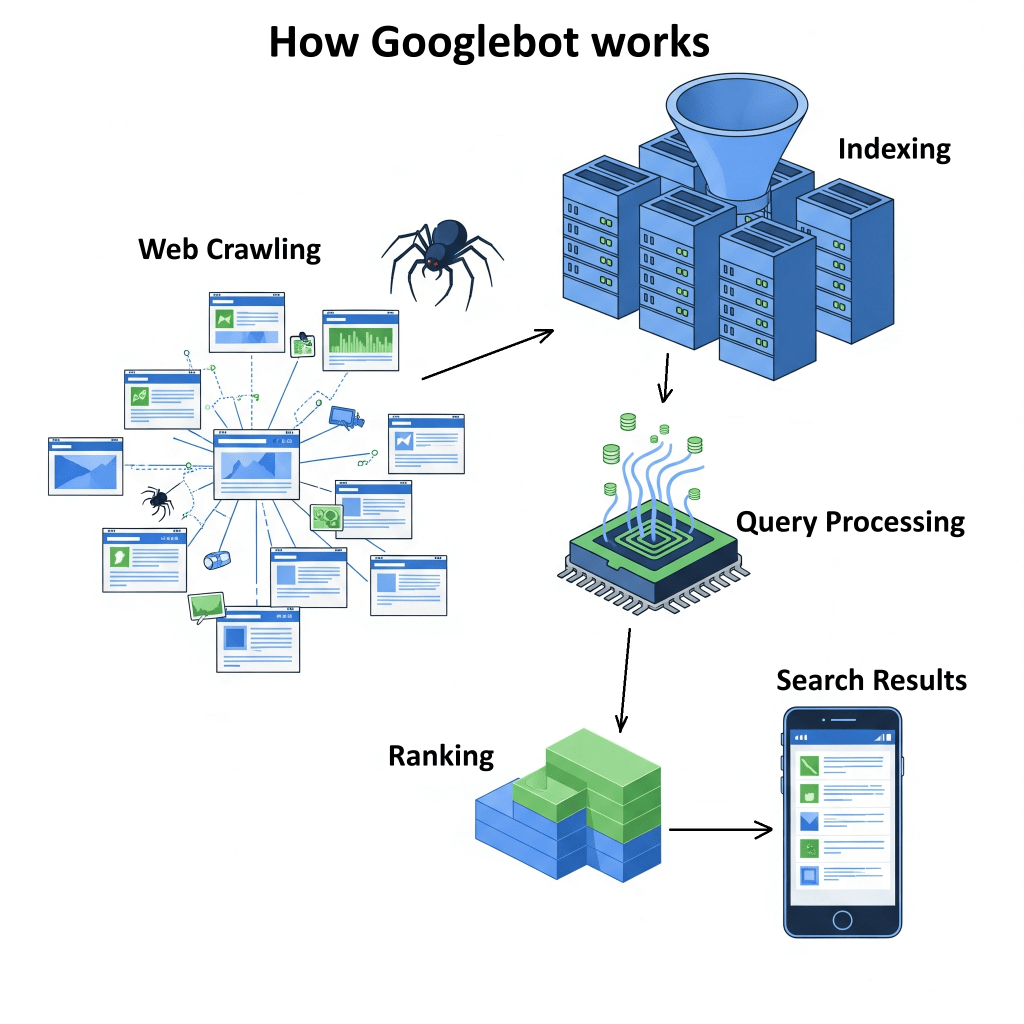
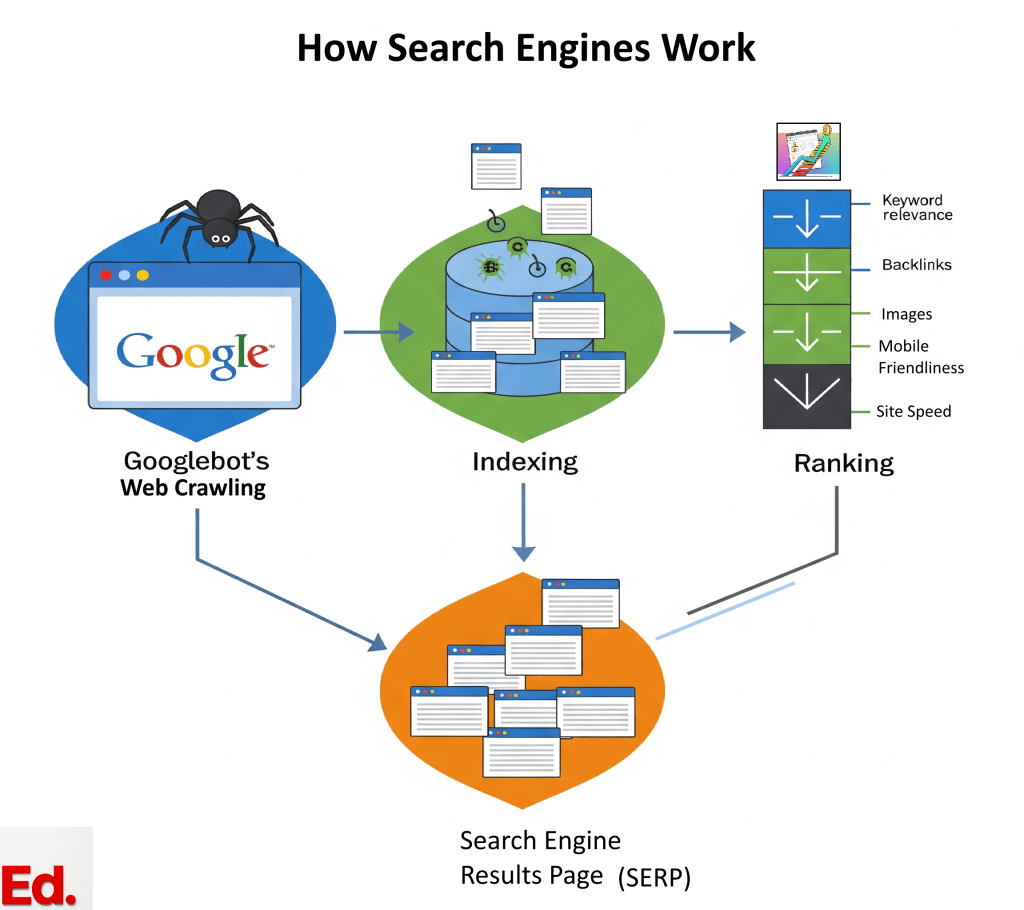
What we do know is that the whole thing involves a process of crawling the web, indexing content, processing queries, ranking results, and then showing you what you asked!

In this guide, I’ll break down some of the key ideas and important parts of Google’s algorithm that influence what pops up in your search results.

What Is Google Search?

This is a search engine that runs on clever software called web crawlers, with the main one being Googlebot.

These crawlers go all over the web, finding new and updated pages to add to Google’s huge index.

Every day, Google handles more than 8.5 billion searches, which really shows off how fast and scalable it is.

The whole thing is runs on some heavy tech, using:

  • distributed computing
  • advanced web crawling tricks
  • detailed indexing
  • complex ranking algorithms, and AI

The setup behind Google Search is spread out all over the globe, with data centers placed in various locations to keep things quick for users.

This system uses a technique called index sharding, whereby the huge database is broken into chunks across several servers. This makes it possible for it to handle all that massive data efficiently.

Google’s Search index is often called “the world’s biggest library,” and it’s not just because of how big it is….it’s also highly dynamic.

Think about it: organizing and keeping up with all that information from “hundreds of billions of webpages” is no small feat!

The huge scale of it all, along with the never-ending stream of new and updated content, really calls for some cutting-edge, distributed computing power and a solid dose of artificial intelligence and machine learning.

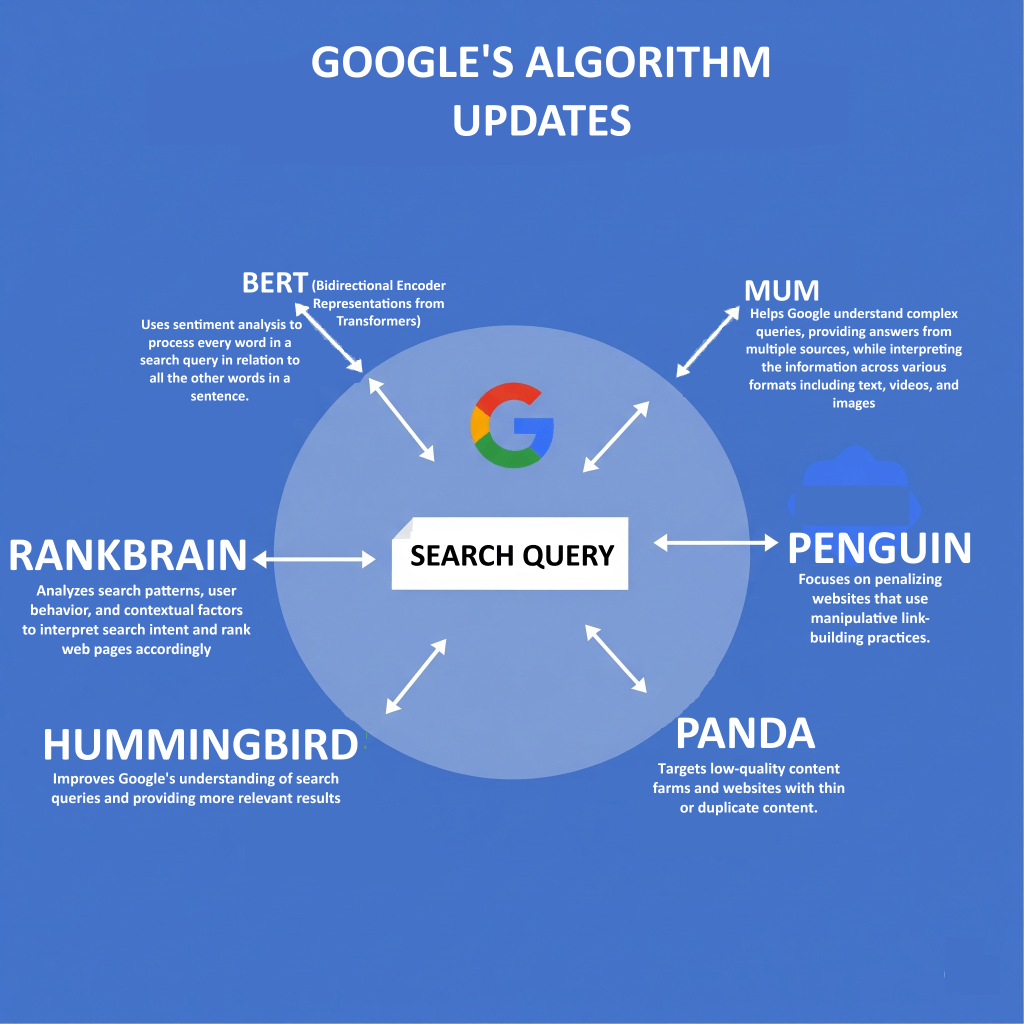
Models like BERT, RankBrain, and MUM are the key pieces that help Google keep up with and make sense of all the information.

We will get to those later…

1. Crawling

Google Search starts with crawling, which is basically the process of finding web pages.

The whole process of crawling is done automatically by some nifty software programs called web crawlers…with Googlebot being the main one.

What Is Googlebot?

Googlebot is like a digital spider that crawls the internet, looking for new and updated pages to add to Googleโ€™s index.

It discovers pages in two ways:

  1. By following links on pages it already knows about (like when Googlebot finds a link from a category page to a new blog post)
  2. By checking out sitemaps that website owners have turned in.

Googlebot uses a clever process to decide which sites to visit, how often to swing by, and how many pages to grab from each site.

It usually favours sites that get updated a lot and those that are considered authoritative.

How Links, Sitemaps, and robots.txt Work Together

Crawlers are designed to chase after “dofollow” links, which play a huge role in finding new content and sharing something known as “link juice”.

As a webmaster, you can help Googlebot find your content quicker by submitting sitemaps into the Search Engine Console.

By acting as a guide that maps out your website’s structure, sitemaps make it easier for the crawlers to do their thing.

On the flip side, if you don’t want Googlebot snooping around your website, you can use robots.txt files, to keep things under wraps.

A robots.txt file is like a traffic cop for your website, letting owners say, “Hey Googlebot, you can’t check out these files or pages”.

Google has made some fire upgrades to how it crawls the web, especially when it comes to rendering web pages.

During a crawl, Google triggers a recent version of Chrome and runs any JavaScript it stumbles upon.

It does this because a lot of modern websites use JavaScript to load content on the fly and without the ability to load Javascript, Googlebot might miss out on some of the page’s features.

In other words, it won’t really get the full picture of how relevant or good a page is, and not index that page.

Also, Googlebot has to be careful not to request too much from websites. If it does, it might bog down servers.

To prevent this, it tunes how fast it crawls based on how the site is responding…

For example, if it runs into HTTP 500 errors (those pesky server issues), it gets the hint to take it easy with the requests.

Plus, crawlers have something called a “crawl budget,” which is like a cap on how many pages theyโ€™ll check out and index on a site during a certain time frame.

Googlebot really has to manage its “crawl budget” carefully, so as not to crash sites, that are on the edge of breaking down.

Itโ€™s tries to find that sweet spot between grabbing all the data it needs and keeping the website running smoothly.

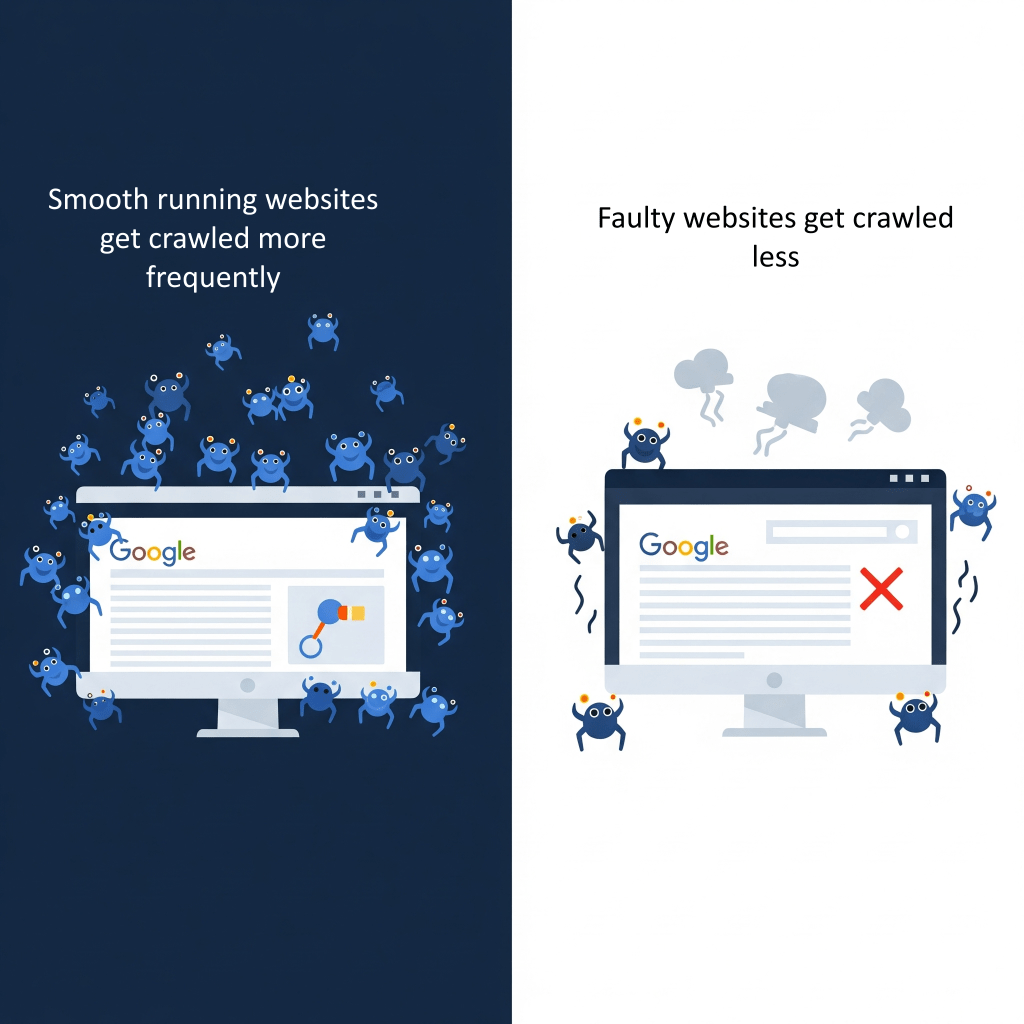
A website that runs smoothly, with few server hiccups and quick loading times, is more likely to get a bigger “budget,”

In other words, well optimized websites, get crawled more often and more deeply!

On the flip side, a site thatโ€™s not pulling its weight might see its “budget” drop…

..leading to updates happening less often in Google’s index…

..leading to stifled visibility in search results…

2. Indexing

After Google finishes crawling, it jumps into figuring out and sorting out the massive amount of info it finds on the web.

An index is basically a giant database spread over tons of computers and is optimized to give quick answers to search queries.

By diving deep into the content, Googlebot can skim through the text, picking out important details like <title> tags and alt text for images, and even looking at the images and videos.

For images, Googlebot grabs the image’s URL, the text nearby, its alt tags, and some other vital details.

What Is Canonicalization?

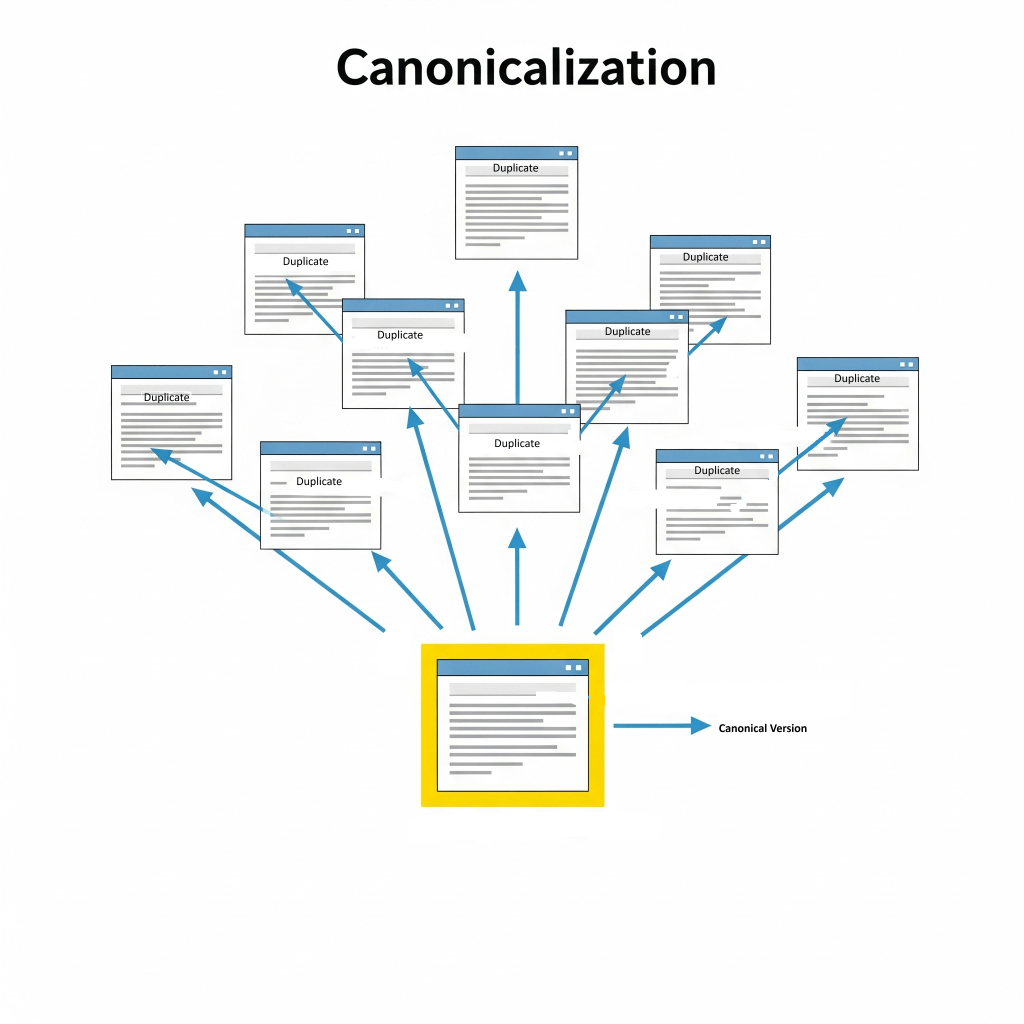
A big part of how Google indexes pages is dealing with duplicate content.

Basically, Google looks at pages on the web that have similar information and groups them together, which they call clusters.

From that group, they pick one page to be the “canonical” version, meaning itโ€™s the one they think represents the best.

This helps avoid those annoying situations where you see the same or very similar content showing up over and over in search results.

The information about each canonical page and its cluster gets stored in Googleโ€™s index.

Googleโ€™s setup for this includes:

  • Colossus for file storage
  • NoSQL databases like Bigtable for compressing and storing data efficiently
  • MapReduce to handle big datasets in parallel

Note that, not every page Google checks ends up getting indexed; it really depends on how good the content and its metadata are.

What is Natural Language Processing (NLP)?

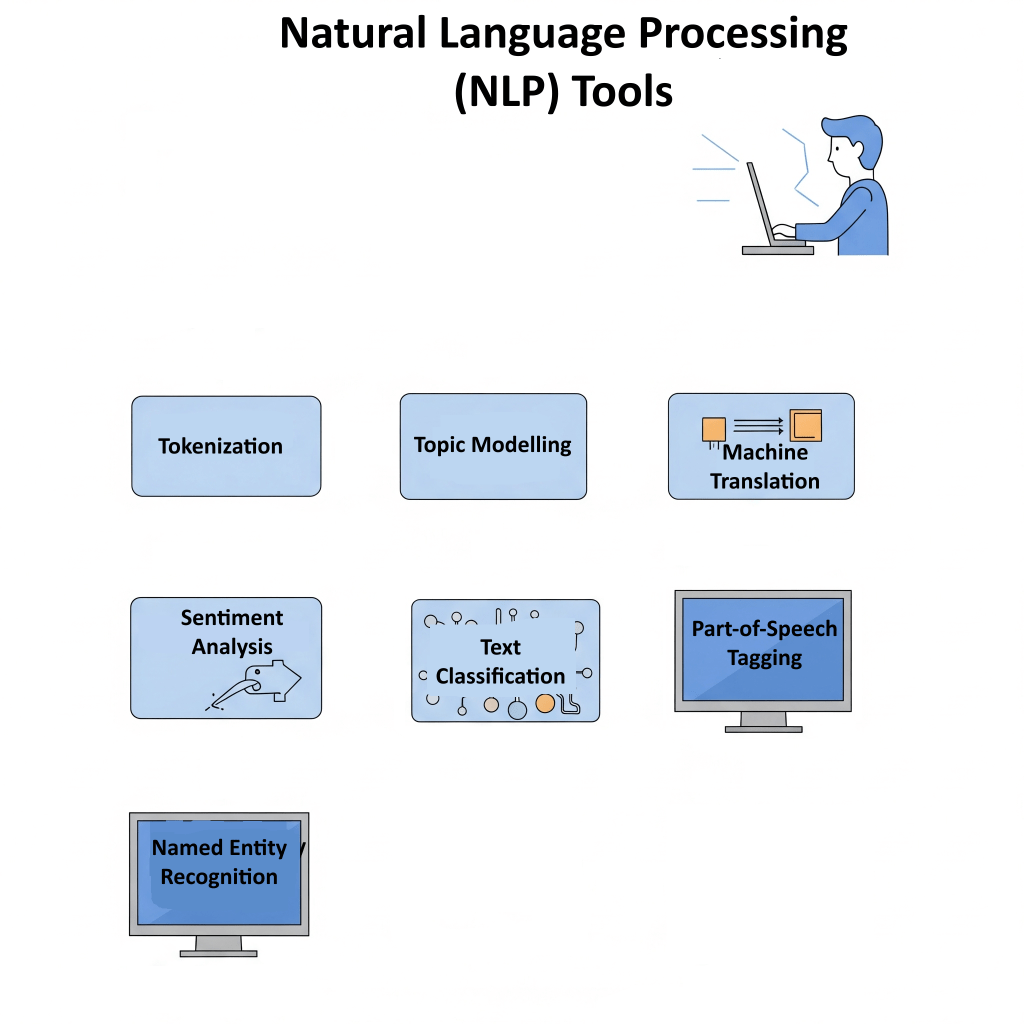
Indexing involves Natural Language Processing (NLP) to dig into the real meaning behind the content and really get the gist of things.

Think of it as the ability to understand that “car” and “automobile” are just different ways to say the same thing, spotting specific names (like knowing “Tesla” is a car brand, not just a scientist), and really getting the overall meaning of the text.

For example, when a webpage talks about “AI-powered search engines,” Google’s ability to understand semantics might also link it to things like “machine learning in search” or “smart search engines.”

As you can see, Google’s algorithm isn’t just about storing random words anymore…

it’s really trying to get what the meaning and connections are between ideas in the content.

This smarter understanding has a big impact on how pages get ranked these days.

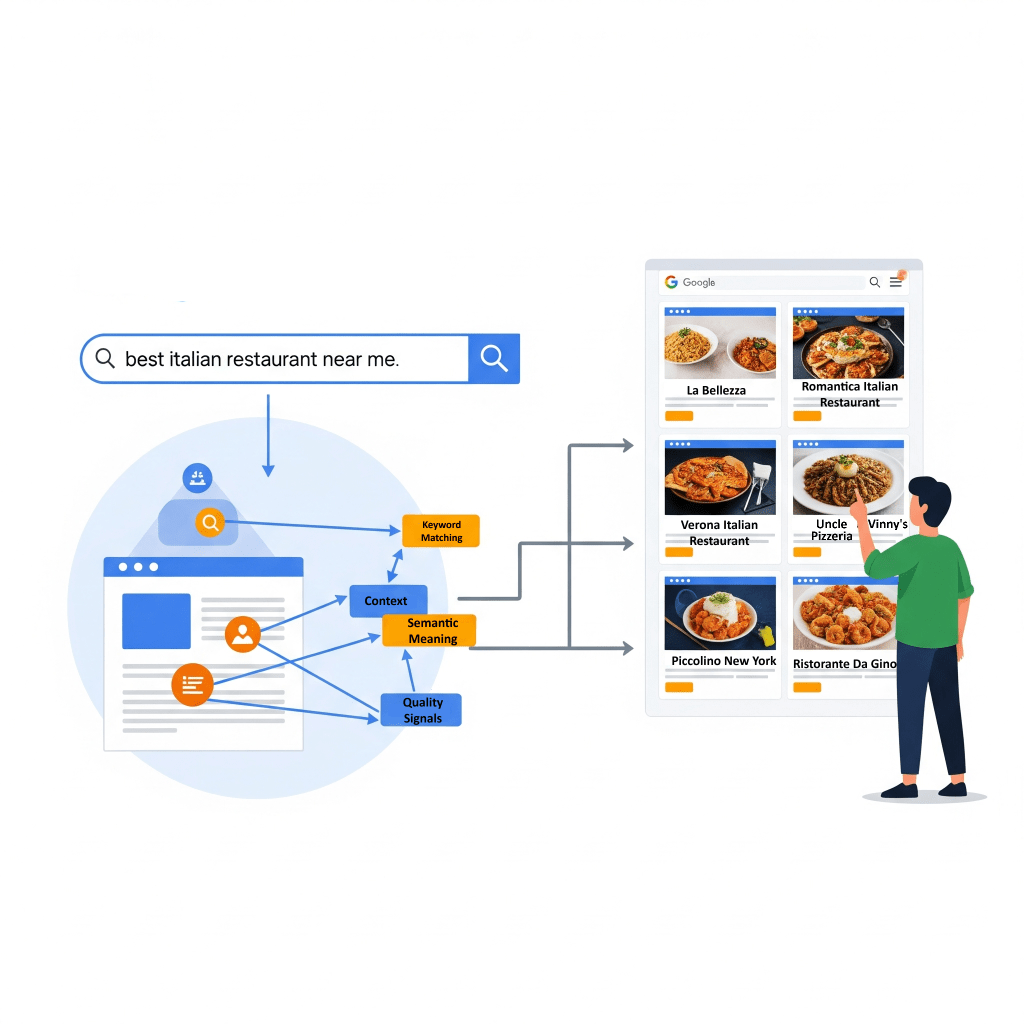
When Google figures out what a page is really about and the context behind it, it can better connect it to what a user is searching for, even if the exact keywords arenโ€™t in the query.

Table 1: Google Search Algorithm

3. Query Processing

When someone types in a search, Google’s algorithm kicks into gear, diving into detective mode to understand what they’re really looking for.

The system begins by interpreting the raw search query, automatically correcting spellings, such as transforming “gogle” into “Google,” to ensure the query is accurately understood.

It also extends to recognizing synonyms and related terms, understanding that “car” and “automobile” refer to the same concept.

Furthermore, Google’s algorithms are capable of entity recognition, which allows them to identify specific entities within a query, distinguishing, for example, “Tesla” as a company from “Tesla” as a scientist.

The Role of Advanced AI Models: BERT, RankBrain, and MUM in Understanding Search Queries

BERT, which stands for Bidirectional Encoder Representations from Transformers, is a neat AI tool that helps Google get how different word combinations can mean different things and show what people really want in their searches.

When it first dropped, BERT changed about 10% of searches, proving just how much it helps with understanding context.

RankBrain is another AI system for Google that figures out how words are related, which means it can pull up relevant content even if doesn’t contain the exact words used in the search query.

Lately, we’ve got MUM (Multitask Unified Model) stepping into the spotlight, and it’s brilliant because it can handle all sorts of infoโ€”text, images, videosโ€”and even different languages to give users better answers for those tricky questions.

Apart from AI Models, Google figures out what you’re looking for based on a bunch of contextual signals, such as keywords, Language localisation and current events.

The words you use are like little hints; for example, if you type in “cooking” or “pictures,” it gets that you’re after some recipes or images.

The language you use also mattersโ€”a search in French will mostly pull up French content.

Plus, they pay close attention to where you are….

..so, if you search for “pizza,” you’ll usually get options for places nearby that deliver.

And when it comes to hot topics, like sports scores or company earnings, the algorithm makes sure to show you the latest info out there.

The shift from just matching keywords to using fancy AI models like BERT, RankBrain, and MUM for processing search queries is a big game-changer for Google.

It shows that Google is getting better at picking up on the nuances and intent behind what people are really asking, instead of just taking words at face value.

This means that the old trick of cramming a bunch of keywords into your content to boost rankings isnโ€™t going to cut it anymore.

Nowadays, you need to focus on creating content that’s genuinely useful and meaningful, really hitting those key points that users care about, because Googleโ€™s algorithms are now pretty good at figuring out what really matters.

4. Ranking

Once Google gets what the user is asking for, it dives into the ranking stage, sifting through its huge index to find and show the best, most useful and most relevant results, in a blink of an eye!

Relevancy comes from hundreds of factors, and how much each one matters can change based on what you’re searching for…

What Are Google’s Top Ranking Factors?

Google uses a bunch of smart signals to figure out what order to show search results in:

1.) Content Quality

The algorithm puts content that are helpful first above all!

It looks for signals that show Expertise, Authoritativeness, and Trustworthiness (E-A-T).

E-A-T is really important for “Your Money or Your Life” (YMYL) content, which covers touchy subjects like health or money matters.

On the flip side, if content is low-quality, it usually means there wasnโ€™t much effort put in, itโ€™s not original, or it lacks skillโ€”think inaccuracies or just plain โ€œfillerโ€ content.

While Expertise, Authoritativeness, and Trustworthiness (E-A-T) are usually talked about as tips for folks rating content, research shows they actually have a big impact on Google’s algorithms.

The concept of E-A-T is aided by human evaluators who provide data that feeds into Google’s machine-learning ranking systems to make them better.

If you’re creating content, keep E-A-T in mind as a key idea for everything you post, since it has a direct impact on how Google’s AI figures out what high-quality info to highlight.

Having top-notch backlinks from trustworthy sources makes all the difference when it comes to showing that you’re credible and trustworthy.

2.) Relevance

When it comes to search results, it really matters how well the content actually matches what someone is looking for.

It’s not just about matching keywords anymore…

Now, the algorithms check if a page has all sorts of relevant materials besides the keywords..

For example, if you search for “dogs,” it might show cute dog pics, videos, or lists of breeds rather than pages that just have the word “dogs” repeated everywhere.

The importance of getting what people really want to knowโ€”whether it’s about finding a place,(commercial intent) learning something new, (Informational intent) or making a purchase (Transactional intent)โ€”can’t be stressed enough.

Keeping things up to date is also important, especially when it comes to stuff like current events. Google tends to give a boost to fresh content so that users get the latest scoop.

3.) Page Experience

This part is all about keeping users happy!

It looks at things like how friendly your site is on mobile, how fast it loads, and whether it uses HTTPS for security.

Key metrics like:

  • Largest Contentful Paint (LCP) for how quickly things pop up,
  • Interaction To Next Paint (INP) for how interactive the site feels,
  • Cumulative Layout Shift (CLS) for keeping things looking nice and steady are super important.

These help measure how real users experience your site and fit right in with what Google looks at for rankings.

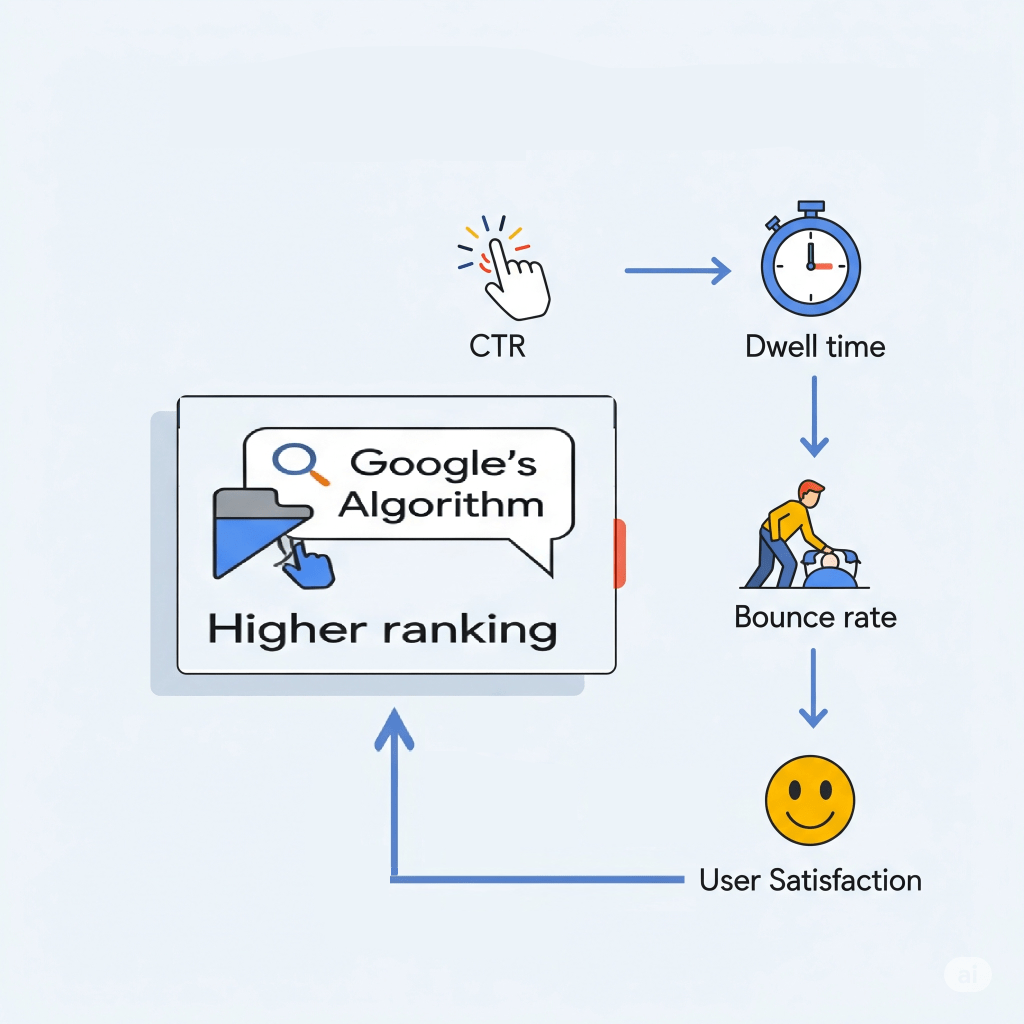
4.) Engagement Metrics

Things like your click-through rate (CTR), bounce rate, and how long folks hang out on your page can totally impact your rankings as well.

When Google collects and analyzes all that user interaction data (keeping it anonymous, of course), it helps their smart systems get a better handle on what type of content really matters.

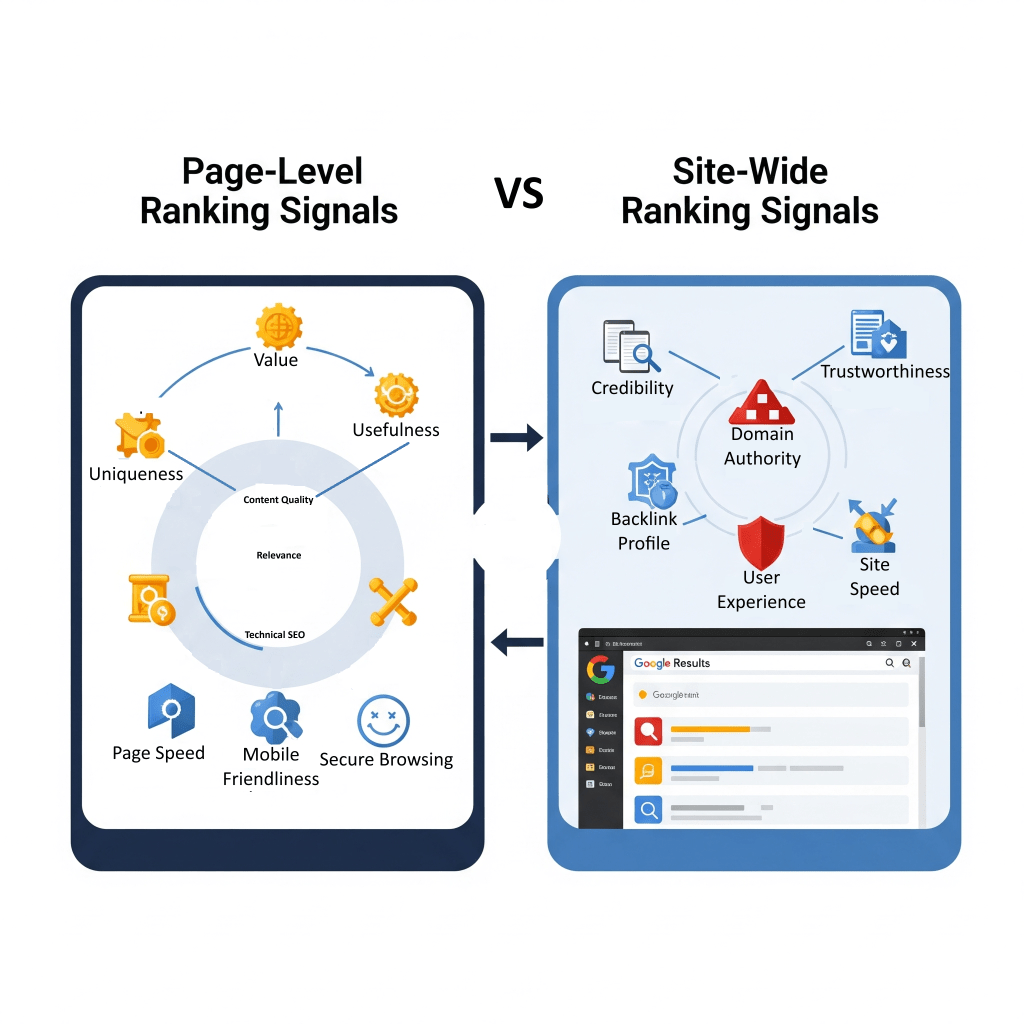
Page-Level Vs Site-Wide Ranking Signals

Google’s ranking systems usually works on a page-by-page basis, using a bunch of different signals to figure out where each page should land in the rankings.

But what if a website happens to have one good page, out of a hundred crappy ones?

This is where site-wide signals and classifications come into play… by helping Google get a better grip on the site as a whole.

Google’s “helpful content system” can affect the rankings of an entire site, not just a single page, especially if the site is mostly churning out content that’s not really helpful but just aimed at tricking search engines.

Table 2: Key Google Ranking Factors and Their Impact

5. Search Results

The last stage of Google’s algorithm is all about getting search results to you extra fast, mixing things up and making it pretty personalized just for you.

Once the ranking process wraps up, the results are snagged from Googleโ€™s speedy data centers around the world and shown to you in just a blink.

This mind-blowing speed comes thanks to an impressive infrastructure that handles quick data access and delivery.

Key players include:

  • Googleโ€™s Content Delivery Network (CDN), which stores those results all over the globe to keep things fast;
  • Colossus, Googleโ€™s nifty distributed file system, makes sure info is pulled up quickly;
  • plus fancy Load Balancing & Sharding tricks that make handling requests smooth.
  • And letโ€™s not forget Spanner, a global database in the mix, helping everything run like a well-oiled machine!

Google Algorithm Updates

Google’s algorithm isn’t stagnant; it’s always changing and adjusting to how the web works, constantly fighting against junk content and shady tactics.

Google often rolls out some pretty big changes to its search algorithms and systems, known as “core updates.”

These updates get announced on Google’s Search ranking updates page and are meant to keep the search engine serving up helpful and trustworthy results.

In 2022, for instance, Google made a whopping 4,725 tweaks to search, which breaks down to about 13 updates every single day, covering everything from ranking system tweaks to user interface changes, and a whole lot more.

Updates come in all sorts of shapes and sizes, and they include:

  • Core Updates: These are major changes that shake up how ranking systems see content on the web. This often means that rankings can go up and down. They aren’t aimed at any particular sites; instead, they change the way we look at overall content quality.
  • (Product) Reviews Updates: So, these updates started off just for product reviews, but now they cover all sorts of reviews like services, businesses, and destinations. The goal? To give a shout-out to those awesome, detailed, and original review contributions!
  • Helpful Content Updates: These updates, which are now available everywhere, boost Google’s ability to figure out content that actually helps people. They focus on “people-first” content that really meets what users are looking for, while giving less love to stuff made just to rank higher in search results.
  • Page Experience Updates: So, these updates are all about mixing in stuff like Core Web Vitals (you know, LCP, FID/INP, CLS), keeping things safe with HTTPS, and making sure everything looks good on mobile when it comes to rankings.
  • Search Spam Updates: These updates are all about cracking down on sneaky tactics, making sure Google gets better at spotting different types of spam in all kinds of languages.

Major historical updates show how this evolution has unfolded over time:

Categories
guide SEO

What is SEO?

In a time when being visible online can greatly affect job opportunities, knowing about Search Engine Optimization (SEO) is becoming more important.

Whether the goal is securing a fancy internship, attracting new clients for a freelance venture, or simply ensuring that your professional profile stands out, initial searches often begin online.

This is where SEO comes into play; by acting as the perfect blend of art and science that almost guarantees a strong digital presence.

But few people truly understand how search engines function. In this article, I’ll explain the key elements of Search Engine Optimization that are essential for anyone looking to build their online presence.

How Do Search Engines Work?

Have you ever thought about how search engines quickly find the information you need? This impressive process happens in three simple steps:

1. Crawling

There are millions of automated programs, often referred to as “web crawlers” or “spiders,” tirelessly exploring the boundless space of the internet.

Their main goal is to find new and updated content – text, images, videos, and moreโ€”by carefully following links from one page to another.

These digital detectives are like Indiana Jones embarking on adventures to find hidden treasures in every corner and crevice of the web.

Once they’ve discovered a page that offers content that they deem valuable, they store it in a library, called an Index.

2. Indexing

After exploring a page (crawling), search engines analyse the content to understand its subject matter, they categorize it, and then store this information in an massive, highly organized digital storage known as an “index.”

This index essentially functions as the search engine’s memory bank, housing billions of web pages readily available for immediate use.

3. Ranking

When someone enters a search query, search engines donโ€™t just show random pages.

They use complex algorithms to carefully sort through their content library and show the most relevant results quickly. This is where online visibility is directly affected.

What is an Algorithm?

An algorithm is a step by step instruction that search engines have to follow in order to complete a certain task.

Their job is to break down complex problems into doable lists of actions that can then be achieved.

Think of it as the process of getting ready for work in the morning. You would have to wake up, brush your teeth, shower, dry yourself, put some clothes on, (hopefully) eat breakfast, etc.

And if you took those steps (in that particular order) you would certainly reach your goal of getting to work early enough for that important 9 o’clock meeting you’ve been dreading all week long!

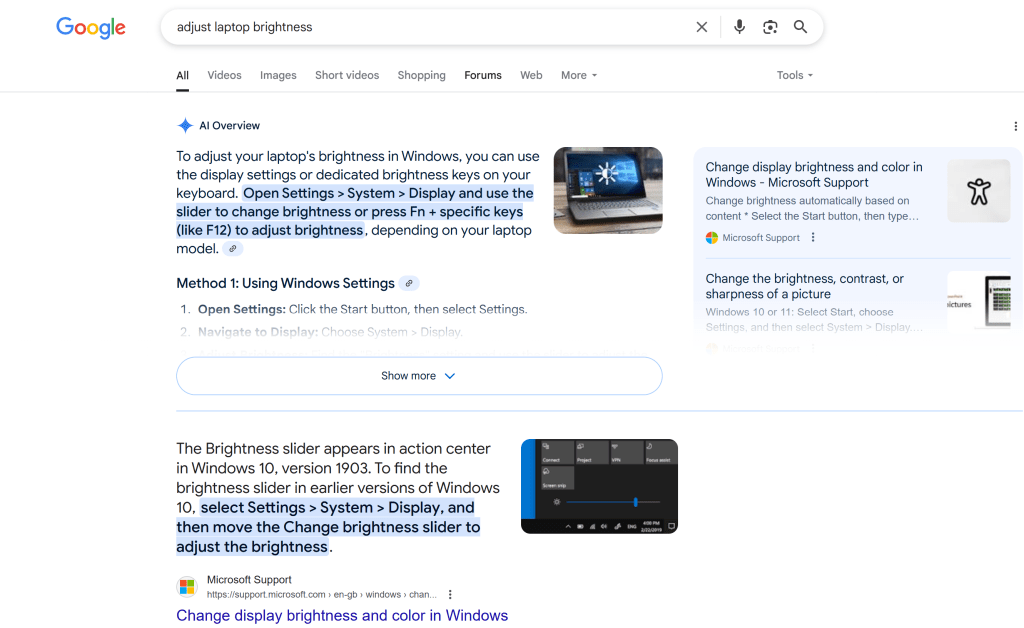
Algorithms strive to understand the intent of every search, even if it is phrased slightly different.

For example, whether you search for “change laptop brightness” or “adjust laptop brightness,” the system gets the related intent behind both phrases and returns similar results.

Image showing a Google search for “Change laptop brightness”
Image showing a Google search for “Adjust laptop brightness”

It will also attempt to make out the type of information desired; so a query containing “cooking” or “pictures” might lead to recipes or images, respectively.

Image showing a Google search for “Cooking”
Image showing a Google search for “Pictures”

The Nature Of Search Visibility

Think of SEO as the construction of a majestic tower that is admired by everyone.

To build one, a solid foundation (Technical SEO) is called for, followed by a visually appealing and well-structured exterior (On-Page SEO), and finally, a strong reputation within the neighbouring community (Off-Page SEO).

All three dimensions must be in place in order for the tower to stand tall and attract a steady stream of visitors.

This hierarchical and interconnected nature of SEO is important to understand for anyone who’s just started learning, because if search engines can’t access a website, efforts in creating content or building links won’t work.

Ignoring basic elements like technical access to your pages can make other efforts useless.

In other words, if you were a professional building an online presence, you must first make sure your personal website works well before spending a lot of time on content or outreach.

The Heart Of A Website (Technical SEO)

Without a strong technical foundation, even the best content may be overlooked, as search engines can’t crawl your site, index it, and therefore, display it in search results.

Factors like page load speed are important in the context of technical seo, as they affect how users engage with and view your website.

Page load speed or mobile-friendliness, are not merely a convenience of users, they are crucial ranking factors that can boost organic traffic.

Pages that take an extended time to load often lead to user abandonment, impacting both user experience and search engine perception.

One key strategy to reduce page load speed is by compressing images and minimizing unnecessary third-party scripts.

Given that the majority of internet browsing occurs on mobile devices, a website must also function and appear flawlessly across all mobile platforms.

Google’s mobile-first indexing approach means that the mobile version of content is primarily used for ranking purposes.

Nailing the Right Keywords

Keywords form the very bedrock of SEO. They are the specific words and phrases individuals input into search engines when seeking informationโ€”whether it’s “best vegan restaurants in Brooklyn” or “entry-level data analyst jobs.”

The importance of keywords lies in their ability to create a direct connection with an audience. As a content creator, you need to understand the kinds of words used by your consumers to describe your products or services.

By understanding the precise language used by your audience, you can tailor your content to align with their search queries, and thereby help search engines in presenting your useful product or information with those who actually need it.

There are two main types of keywords to consider when doing keyword research.

Short-tail vs. Long-tail

Short-tail keywords are broad, general terms (e.g., “marketing jobs,” “photography”). While they boast high search volume, they also face intense competition. Attempting to rank for such terms is akin to competing for attention with global superstars.

Long-tail keywords are more specific, often longer phrases (e.g., “entry-level digital marketing jobs remote,” “freelance portrait photographer for graduation”).

Individually, they may have lower search volume, but they hold significantly higher user intent. This means people searching for long-tail keywords typically have a clear idea of what they seek.

Long-tail keywords have a strategic advantage, because they target a niche audience with considerably less competition.

So instead of trying to rank for broad terms, target specific, high-intent phrases to gain initial visibility in less competitive, relevant niches.

This strategy builds momentum and attracts the right visitors to your site.

How to Find Useful Keywords

Begin by brainstorming terms that describe your skills, services, or content. Consider what you might search for to find your own website.

Reflect on the problems your content or services solve.

Here are a few services that I would recommend using, as a free yet highly effective option for finding useful keywords:

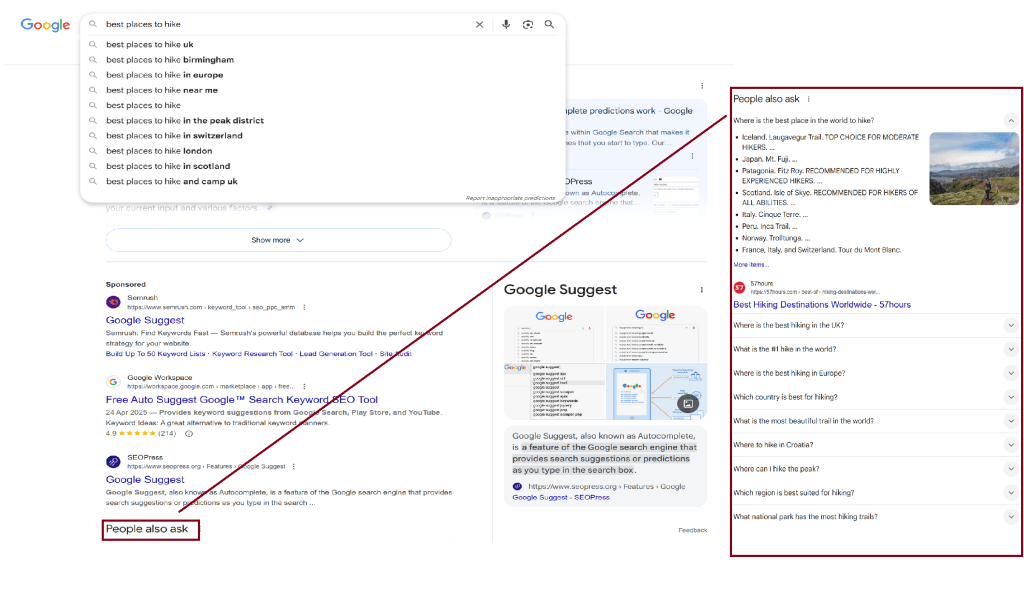
1.) Google’s Suggestions

Try typing your product or similar offerings into Google, and then observe the suggested terms that appear.

These are genuine searches that have been done by real users. They offer a good starting point for finding out the type of words used to search for your content.

Another good place to look, is the “People also ask” section on search results pages:

2.) Competitor Analysis (ethically!)

Browse the websites of professionals in similar roles or industries.

Pay attention to the terms they use in their page titles, headings, and content.

This can provide valuable insights into keywords that are already effective within your specific niche.

3.) Online communities

Engaging with forums such as Reddit or Quora can be a goldmine for long-tail keywords.

Observe the questions people are asking and the pain points they discuss.

Ask Yourself: What are people really looking for?

Every search query has a specific purpose, known as search intent. Understanding this intent is the key for making content that truly connects with your audience.

  • Informational Intent: The user seeks to learn something (e.g., “how to make a latte,” “what is SEO”).
  • Navigational Intent: The user is attempting to locate a specific website or brand (e.g., “LinkedIn login,” “Squarespace templates”).
  • Transactional Intent: The user is ready to make a purchase or take a specific action (e.g., “buy handmade leather wallet,” “hire freelance graphic designer”).

Aligning your content with the user’s intent is important because it ensures the attraction of the right visitorsโ€”those who are genuinely seeking what you’re offering.

For instance, when optimizing a LinkedIn profile, it is not enough to simply list skills; those skills should be framed in terms of the solutions or information a potential employer or client is intending to find.

If a recruiter has a “transactional intent” (e.g., “hire junior software developer”), your profile should clearly highlight projects and achievements that directly fulfil that need.

As you can see, keyword research is more than a purely technical task but also a strategic content planning exercise.

Pimp My Website! (On Page SEO)

On-Page SEO is about the changes made directly on webpages, – like content, images, and headlines, which help search engines and visitors understand the page’s topic and value.

This means creating good quality content that are informative, engaging, well-written, and directly address your audiences’ needs.

What Makes Good Quality Content?

Good quality content are contents that offer unique value beyond merely regurgitating existing information.

In other words, they present fresh perspectives, original research, new data, or a fresh, more effective approach to a topic.

Lengthy blocks of text can discourage readers from fully consuming your content. Breaking up content into shorter paragraphs, using bullet points, and bolding or italicizing key information significantly improves readability.

This makes content easier to skim and digest, encouraging readers to remain engaged for longer periods.

The readability of content directly contributes to SEO by influencing user experience signals.

If users find content challenging to read (e.g., due to long paragraphs or a lack of headings), they are more likely to “bounce” (leave the page quickly).

This will have a knock on effect on your rankings, as high bounce rates and low time-on-page metrics signal to search engines that the content may not be good-quality or relevant, which can negatively impact rankings.

Image Optimization

Images are great for breaking up text into visually digestible bits that can be easily understood.

But be careful when choosing images to use for your page, as they can be troublesome if not used properly.

Large image files can cause slow page loading and make users leave your site.

If you notice that your pages are taking too long to load (2.5 seconds or more) try using JPEG Optimizer or TinyPNG. These free tools are great for reducing file sizes effectively.

Fish For Compliments (Off Page SEO)

While On-Page SEO involves elements within a website, off-page SEO is about building a positive reputation online, with external activities that influence rankings.

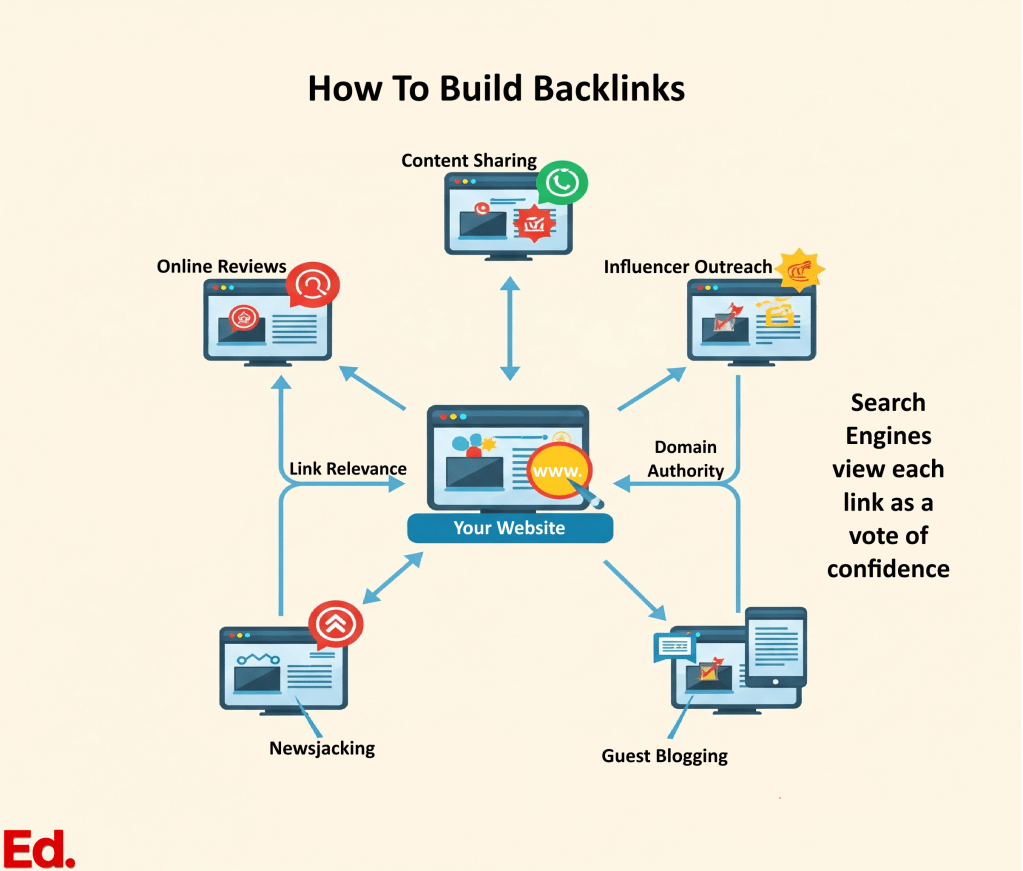
Backlinks are one way to build a positive reputation for your site. Often regarded as the internet’s “Vote of Confidence”, a backlink is simply a link from another website that points to your own.

The greater the number of high-quality, relevant backlinks, the more authoritative and trustworthy your site appears in the eyes of a search engine.

You shouldn’t merely focus on acquiring any links, but on securing them from authoritative, relevant, and trustworthy sources.

A single link from a reputable industry publication holds significantly more value than numerous links from low-quality or spammy blogs.

How do I earn backlinks?

Building backlinks involves creating genuinely valuable, shareable content that others naturally desire to link to.

This can be through guest blogging on reputable sites within your niche or actively engaging on social media to promote your content and sharing.

Online Reviews

Positive reviews on platforms like Google My Business (for local businesses) or industry-specific review sites build trust with an audience and can influence purchasing decisions.

They also send positive brand signals to search engines.

Guest Blogging & Influencer Marketing

Contributing articles to other reputable blogs or collaborating with influencers in your field can build exposure, authority, and earn valuable links.

Forums & Online Communities

Platforms such as Quora and Reddit offer opportunities to engage in conversations, share knowledge, and build trust within niche communities.

Digital PR

Securing features for your name or content in online publications, news sites, or industry roundups can drive referral traffic and enhance brand awareness.

Social Media

Although social shares are not a direct ranking factor, social media platforms serve as powerful amplification tools.

They facilitate reaching potential clients, engaging with an audience, and driving traffic to content, which can indirectly lead to backlinks and enhanced visibility.

These off-page SEO activities create a smart way to build connections and manage your digital reputation. They lead to clear strategies for personal branding and career growth.

This includes actively cultivating a professional network, seeking recommendations on platforms like LinkedIn, contributing expert opinions to industry blogs, engaging in relevant online communities, and consciously managing your online reputation (e.g., requesting testimonials, ensuring consistent information across various digital platforms).

SEO As A Career Boosting Tool

A LinkedIn profile functions as a professional’s online resume, often serving as the initial point of contact for recruiters and hiring managers.

Optimizing it for search significantly increases the likelihood of being discovered for relevant opportunities. Keywords are essential here!

Think like a recruiter and imagine the terms would they use to find someone with specific skills or experience?

Adding these keywords naturally into the profile’s headline, “About” section, experience descriptions, and skills section could be the difference between securing a job or being lost in a pile!

For example, changing a vague “Creative Person” to “Graphic Designer | Brand Strategist | UI/UX Enthusiast” makes a profile much easier to find in a pool of hundreds of accounts.

But optimizing the LinkedIn profile for search means more than just adding keywords in the “About” section, highlighting your achievements or listing duties.

To become a magnet for personal branding, you have to engage with the platform consistently, connect with relevant professionals, and even consider adding structured data (schema) to a personal website that links to LinkedIn. All these things can help search engines understand your professional value!

This approach to personal branding is no different from a small-scale SEO campaign. The contexts might not be same but the tactics are similar:

  • Using careful word selection (keywords) to improve a LinkedIn profile
  • Arranging profile sections thoughtfully (similar to on-page optimization)
  • Networking strategies (like off-page link building)

For designers, photographers, writers, and artists, you can use SEO as a modifier of your digital showcase by attracting the right clients and collaborators.

Deconstructing SEO Buzzwords

Some SEO professionals like to use fancy lingo that make learning sometimes feel like you’re acquiring a new language. This mini-glossary is a quick reference for common terms, making your SEO learning journey easier.

SEO TermWhat It Means (in plain English!)
Alt TextA text description of an image on a site, embedded in the backend. It helps search engines understand images and aids accessibility for screen readers.
Anchor TextThe visible, clickable words in a hyperlink.
AuthorityA website or page’s credibility and ability to rank high in search results, often influenced by backlinks and content quality.
BacklinkA link from another website to one’s own. It is considered a “vote of confidence” from the linking site.
Bots (Web Crawlers/Spiders)Automated programs utilized by search engines to discover and scan web pages.
Canonical URLThe “preferred” or original web address for a piece of content, used when similar content exists on multiple URLs to avoid duplication issues.
CrawlingThe process by which search engines discover web pages by following links across the internet.
CSS (Cascading Style Sheets)Code that dictates the visual appearance of a website, including fonts, colors, and layout.
DomainThe primary web address of a site (e.g., www.yourwebsite.com).
External LinkA link from one’s website to a page on a different website.
Heading (H1, H2, H3)Text on a website contained within HTML heading tags, used to structure content and signal importance to both readers and search engines.
HTML (Hypertext Markup Language)The standard coding language used to create web pages.
Indexed PagesPages on a website that have been stored and organized within a search engine’s database.
IndexingThe process of analyzing and storing discovered content within a search engine’s database.
Internal LinkA link from one page on a website to another page within the same website.
KeywordA word or phrase that individuals use when searching for information online.
Long-tail KeywordA longer, more specific search phrase (typically three or more words) characterized by lower competition and higher user intent.
Meta DescriptionA concise summary of a web page (usually 155-160 characters) that appears beneath the title in search results.
MetadataData embedded in a page’s HTML code that provides information about the page to search engines.
NofollowA tag that instructs search engines not to pass SEO credit or “link juice” to a linked page.
Off-Page SEOSEO activities conducted outside one’s website to improve its ranking, such as building backlinks and securing brand mentions.
On-Page SEOSEO activities performed on one’s website pages, including optimizing content, titles, and images.
Page TitleThe main title of a specific web page, displayed in browser tabs and search results.
Ranking FactorsThe various elements that search engines consider when determining a page’s position in search results for a specific query.
Robots.txtA small file that instructs crawlers which parts of a site they should not access (e.g., administrative pages).
Search QueryThe words or phrases typed into a search engine by a user.
Search VolumeThe estimated number of times a keyword is searched per month.
Security(HTTPS)Ensuring a website uses HTTPS (indicated by the padlock icon in the browser bar) is both a ranking factor and a critical element for building user trust.
SERP (Search Engine Results Page)The page displaying results after a search query is entered.
Site ArchitectureThe overall organization and linking structure of all pages on a website.
Sitemap (XML)A file listing all important pages on a website, submitted to search engines to facilitate efficient crawling and indexing.
Structured Data (Schema Markup)Code added to a website to help search engines better understand content, often enabling the display of “rich snippets” in search results.
Technical SEOThe process of optimizing the technical aspects of a website (e.g., speed, mobile-friendliness, crawlability) to improve search engine rankings.
TrafficThe number of visitors to a website.
URLThe web address of a specific page on a site.
User Experience (UX)The overall quality of a user’s interaction with a website, encompassing ease of use, speed, and design.
Categories
guide

Die Top 10 Trends fรผr digitales Marketing, die Sie bis 2022 beobachten sollten (German)

Die zukรผnftigen Trends, die Sie zuvor fรผr Ihre digitale Marketingstrategie verwendet haben, sind mรถglicherweise veraltet. Erfahren Sie, welche neuen Trends heute wichtig sind.

Im vergangenen Jahr wurde die digitale Transformation fรผr Unternehmen aller Art zur Realitรคt, da die globale Pandemie das Tempo der Verรคnderungen um Jahre beschleunigte.

Die Zukunftstrends, die Sie zuvor fรผr Ihre digitale Marketingstrategie verwendet haben, sind mรถglicherweise veraltet, wรคhrend vรถllig neue Themen aufgetaucht sind, die unsere Aufmerksamkeit auf sich ziehen.

Die Bedรผrfnisse und das Verhalten der Verbraucher haben sich dramatisch verรคndert.

In dieser Kolumne werfen wir einen Blick auf die aktuellen Trends und darauf, wo Sie sich auf die Budgetzuweisung in den kommenden Quartalen vorbereiten sollten, um Ihrer Konkurrenz einen Schritt voraus zu sein.

Categories
guide

Was ist Programmatic Marketing? (German)

Der ultimative Guide fรผr 2021

Die Zahlen lรผgen nicht.

Bis Ende 2021 sollen 88 % des gesamten digitalen Display-Marketings in den USA รผber programmatische Werbung erfolgen.

Warum setzen Werbetreibende bei ihren Display-Kampagnen zunehmend auf Programmatic, und was ist das wirklich?

Kurz gesagt, Programmatic Advertising ist eine Mรถglichkeit, digitale Kampagnen automatisch zu kaufen und zu optimieren, anstatt direkt von Publishern zu kaufen.

Es wurde entwickelt, um menschliche Verhandlungen durch maschinelles Lernen und KI-Optimierung zu ersetzen. Ziel ist es, die Effizienz und Transparenz sowohl fรผr den Advertiser als auch fรผr den Publisher zu steigern.

Dies geschieht durch Echtzeitauktionen, bei denen Anzeigen gekauft werden, wรคhrend ein Besucher eine Website lรคdt.

Wenn Sie mehr รผber Programmatic und ihre Funktionsweise erfahren mรถchten, ist dies der Artikel fรผr Sie!

Categories
guide

Die 6 Effektivsten Social Media Werbung im Jahr 2021 (German)

Obwohl es Hunderte verschiedener Marketingstrategien gibt, kann nur eine vom ersten Tag an konsistente Umsรคtze erzielen: Social Media-Werbung.

Eine 19-minรผtige Lesung...


Inhaltsverzeichnis

    Social Media-Werbung oder Social Media-Targeting sind Anzeigen, die Nutzern auf Social Media-Plattformen zur Verfรผgung gestellt werden. Soziale Netzwerke verwenden Benutzerinformationen, um hochrelevante Werbung basierend auf Interaktionen innerhalb einer bestimmten Plattform zu schalten. In vielen Fรคllen, wenn der Zielmarkt mit der Nutzerdemografie einer sozialen Plattform รผbereinstimmt, kann soziale Werbung bei niedrigeren Anschaffungskosten zu einer enormen Steigerung der Conversions und Umsรคtze fรผhren.

    Was sind die Vorteile von Werbung auf Social Media-Kanรคlen?

    Der Grund warum Social Media-Werbung deine beste Werbemรถglichkeit fรผr eine schnelle Kapitalrendite ist? Nun, weil …

    • Die meisten Kanรคle eine erhebliche Vorlaufzeit benรถtigen, um eine Kapitalrendite zu erzielen. Zum Beispiel funktioniert Content Marketing im Laufe der Zeit am besten, nachdem es Backlinks und SEO-Traktion hervorgebracht hat.
    • Einige Kanรคle schnelle Ergebnisse liefern, aber nicht Tag fรผr Tag. Zum Beispiel kann Influencer-Marketing bei geringem Aufwand (wenn auch hohen Kosten) schnelle Umsatzergebnisse erzielen. Diese Ergebnisse treten jedoch im Laufe der Zeit nicht mehr auf. Stattdessen verdienst du Umsรคtze pro Post und oft weniger bei jeder Verรถffentlichung.
    • Einige Kanรคle konsistent, aber zeitaufwรคndig beim Einwรคhlen sind. Beispielsweise kann AdWords konsistente Ergebnisse fรผr deine Marke erzielen. Es dauert jedoch eine Weile, bis du eine bestimmte Platzierung beherrschst und gewinnst.